

All versions since v0.6.0-beta
v0.6.0-beta
Welcome to another release of CrowdSec Local Dashboard. This one makes alerts more useful, gives decision details a much better home, and adds a lot of polish across desktop and mobile. I hope you like it. Please let me know what you think and where it can improve.
Highlights
Alerts now explain what happened
The dashboard has always shown hosts and decisions. This release goes further by parsing the CrowdSec alert that produced each decision. A new integrations system turns source-specific alert data into readable evidence, so you can see details such as paths, ports, usernames, rules and request information instead of a generic row. The release includes integrations for AppSec, SSH, Traefik and OPNsense, with more sources to follow.
Stored alert data is kept and can be parsed again when a decision is opened, so parser improvements can make existing evidence more useful without fetching the alert from the Local API again.
Decision details have a proper home
Expanded decisions now open in a drawer instead of taking over a table row. The drawer gives the full alert context, parsed evidence, request metadata and timing information enough room on desktop, while making the same details much easier to inspect on a phone. Nothing important is hidden behind hover states or squeezed into a truncated row.
The first screenshot shows the new desktop layout. Be sure to visit the newly added documentation site too, which includes integration guides and a full overview of the dashboard. The README also has updated desktop and mobile screenshots.
Better tables on desktop and mobile
Tables now scroll independently while the toolbar and pagination stay available. Filters remain usable on narrow screens, touch devices can pull to refresh, and forms such as creating a user open in drawers when space is limited. The goal is to keep the same useful information available everywhere without making the interface feel cramped.
Clearer connection and offline states
The dashboard now distinguishes between being offline, being unable to reach the server, and an evidence request still loading or failing. It also ships with a proper offline page, a complete PWA manifest and mobile safe-area support.
Retention and performance improvements
Retention can now prune records by age as well as count, with an index added for the age-based query. Decision loading also avoids sending the same host data once per row, making larger tables less wasteful.
Upgrading
Download the compose file for this release, then pull and restart the container:
curl -o docker-compose.yml https://raw.githubusercontent.com/ollioddi/crowdsec-local-dashboard/main/docker-compose.ymldocker compose pulldocker compose up -dThe SQLite database lives in the db volume and survives updates. The container applies pending schema changes when it starts.
If you are upgrading from 0.5 or earlier, move your settings into a .env file beside docker-compose.yml. See the deployment guide for the details and for upgrades from older releases.
Breaking changes
There are no breaking changes for current 0.5.x installations. Older installations may need the configuration or database ownership steps described in the deployment guide.
Changes
Features
- db: Store decision scope, simulation flag and alert timing (24a7b27)
- retention: Prune by age as well as count, and index the query (#65, 37eb8f5)
- table: Scroll the body, pin the toolbar and pagination (793bc66)
- decisions: Confirm deletes, lead with evidence, tighten the rows (#66, 123be4a)
- pwa: A complete manifest, an offline page and safe areas (88aaa9d)
- table: Pull to refresh on touch (#67, a81bab6)
- docs: Publish the docs as an Astro Starlight site (5666c4f)
- db: Keep alert provenance and raw meta (16583e0)
- parsing: Read alerts through integrations and facets (1258809)
- sync: Store the raw alert and its provenance for the parsers (11b3b8f)
- decisions: Re-parse the stored alert when a row is expanded (91e0c53)
- ui: Rework the expanded decision row (16673f0)
- ui: Open expanded cards as a sheet on phones (02c66d5)
- ui: Keep filter chips to one row on phones (#82, 5554cf7)
- sse: Send the heartbeat as an event (a9cf0be)
- pwa: Register the worker in dev and leave the offline page by itself (e01cfd3)
- ui: Say offline instead of live, and instead of fetch failed (d815417)
- ui: Show a retry panel when the server cannot be reached (8783e71)
- ui: Say the evidence is waiting or failed rather than missing (5821a27)
Bug fixes
- lapi: Treat an already-removed decision as a successful delete (6a07009)
- sync: Report alert fetch failures instead of swallowing them (#63, 632649f)
- sync: Recover entries for alerts stored before extraction existed (#64, 97fb4ee)
- ui: Restore pointer cursors, badge contrast and quiet scrollbars (7ed084c)
- users: Put the create form in a drawer on narrow screens (#71, c4a1911)
- table: Draw row separators as insets so Firefox keeps them (#73, b11168d)
- ui: Stop one field swallowing the expanded row’s width (#74, 5edc0df)
- theme: Follow the system scheme while it is selected (#76, a9b973e)
- ui: Read the toaster theme from the app, not the OS (#79, 08dd1b0)
Performance
- decisions: Send hosts as a lookup instead of once per row (3c972ca)
Documentation
- changelog: V0.5.1-beta (#59) (#59, 0aa5c74)
- readme: Keep the OIDC variables inside the configuration table (9fa8bec)
- Move the setup guides out of the README into docs/ (810e647)
- Describe the parsers and the reworked expanded row (#83, 6a14a56)
- integrations: One page per source with desktop and phone captures (#84, c1bdc1d)
- Describe offline behaviour and how to test it (#85, c23c10a)
- Refresh release screenshots (#87) (#87, 02d0c58)
Dependencies
Full diff: v0.5.1-beta…v0.6.0-beta
v0.7.0-beta Latest
This release fixes a security issue, adds mailcow evidence, gives hosts a real overview and makes sync far cheaper. Please update right away.
Every earlier release let anyone who could reach the dashboard create a local account. The sign-in page never offered registration, but the sign-up endpoint behind it was enabled, and a created account has full access: read and delete decisions, manage users. Update, then open Users and delete any account you did not create. Deleting a user ends its sessions.
Highlights
Mailcow evidence
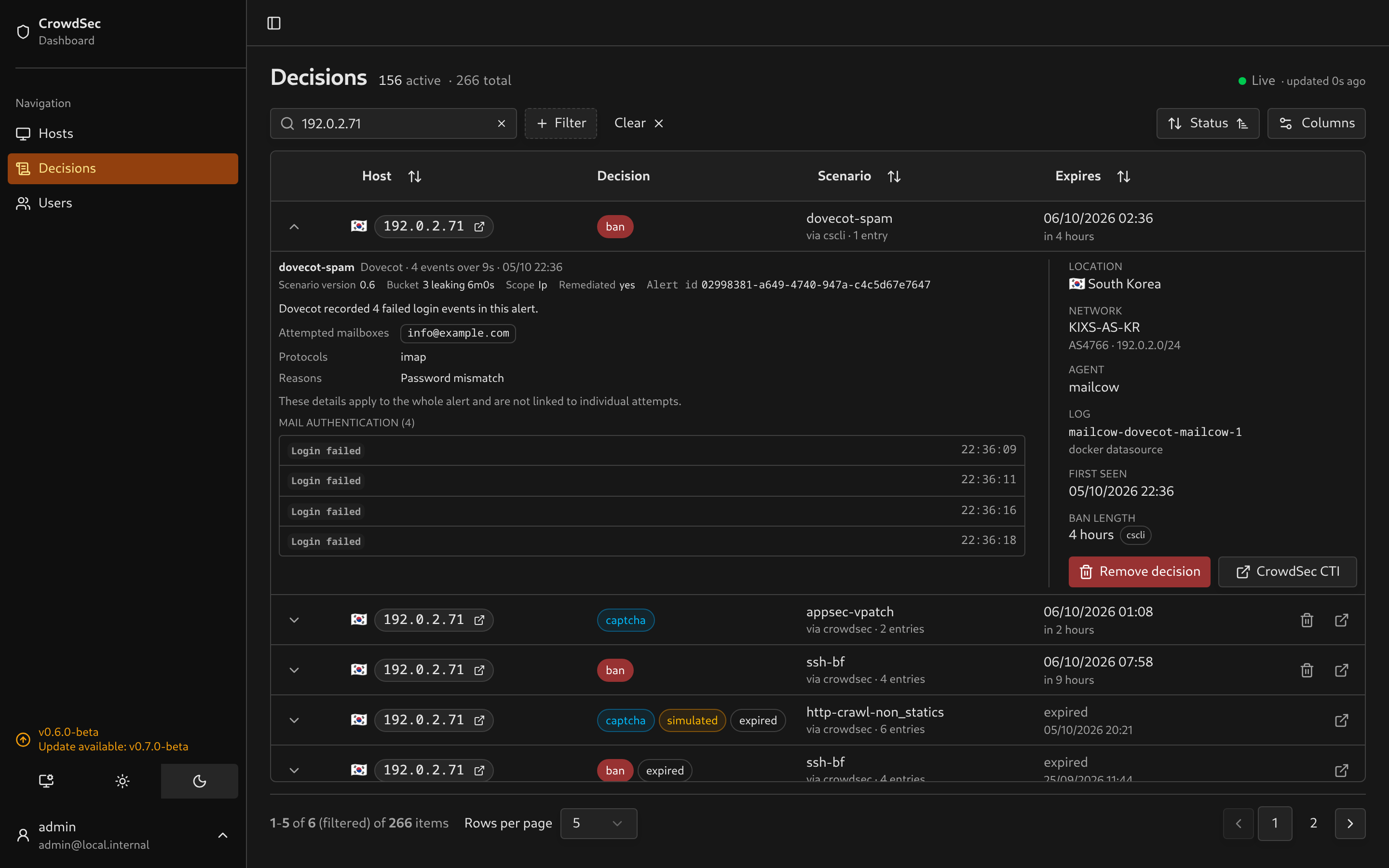
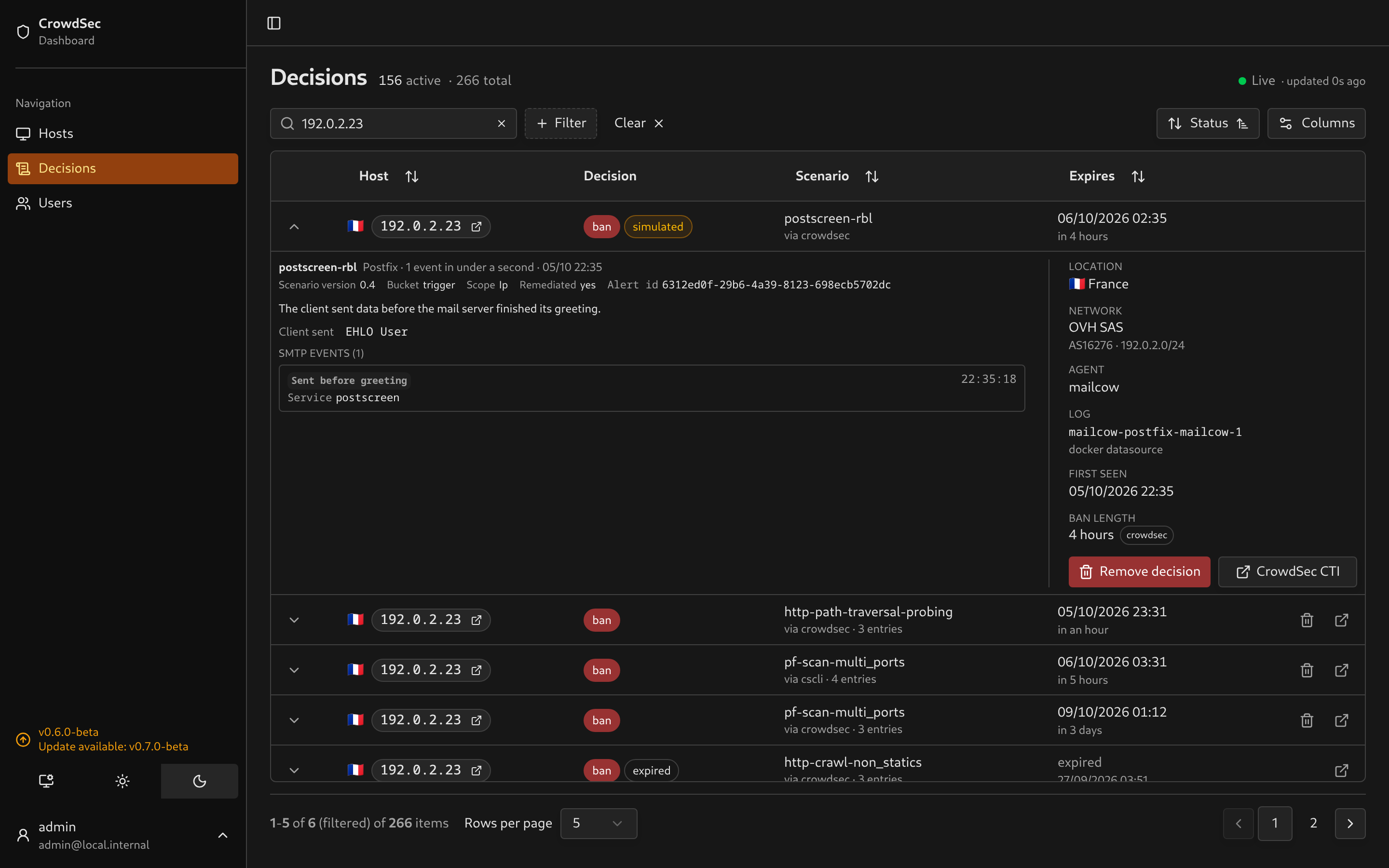
Dovecot alerts show the mailboxes tried, the protocol, the failure reason and the result of each attempt. Postfix and postscreen alerts show what the client sent, the disconnect stage, the verdict and the reason, with a plain explanation of pregreet violations and clients speaking HTTP or TLS to an SMTP port. Both have a page in the docs. Alerts synced before this release are parsed again when opened.
Hosts show what an IP has been doing
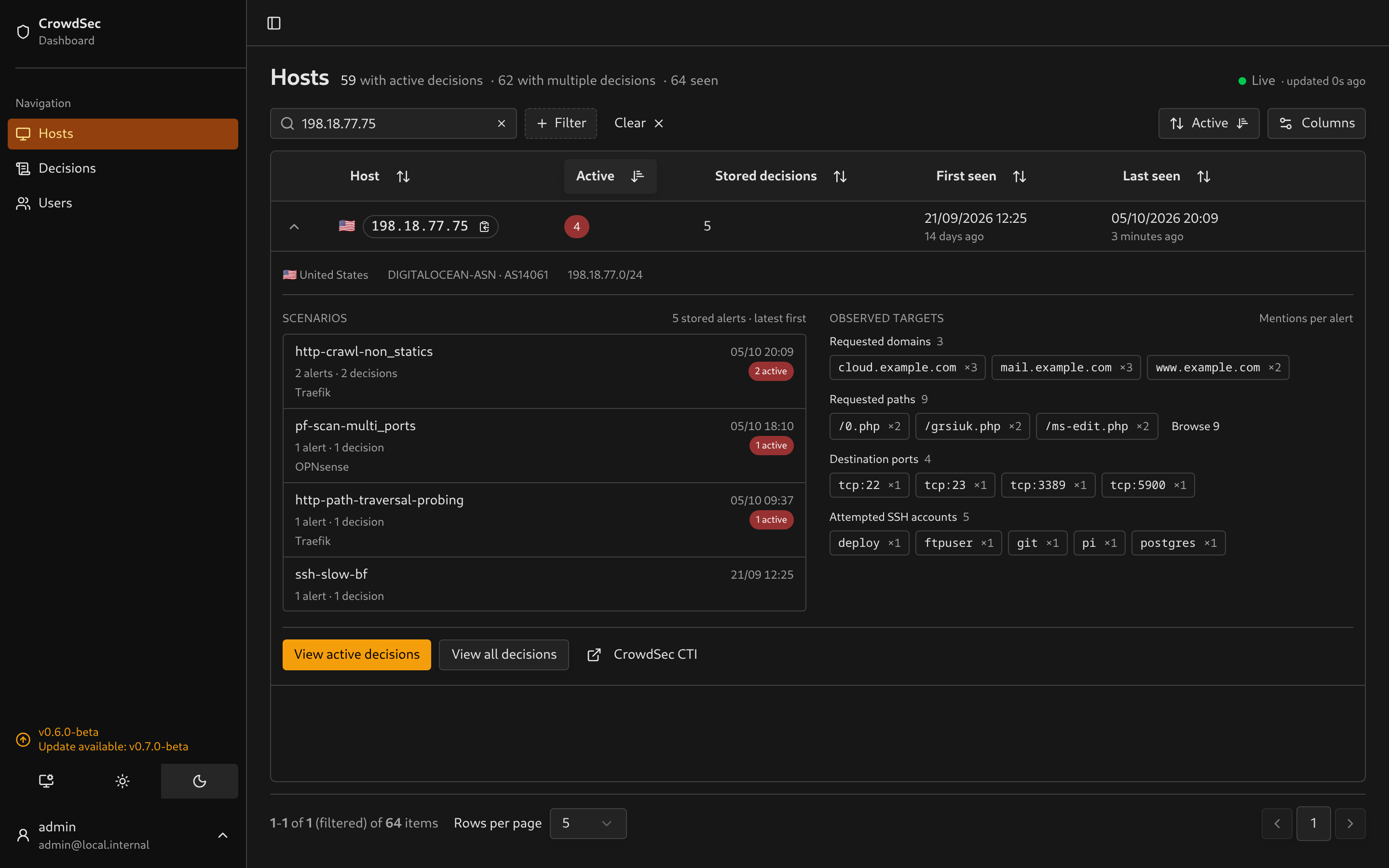
Expanding a host now loads its retained history: which scenarios fired, with counts and latest occurrence, and the domains, paths, accounts, ports and rules it targeted. Each value counts once per alert. Selecting a scenario opens the matching decisions. Nothing loads for hosts you do not expand. Details in Using the dashboard.
I hope you’ll enjoy this part, as i’ve missed a better overview of the actors hitting my own instance. If you have feedback, let me know!
Sync no longer blocks the dashboard
SQLite now runs in WAL mode. Every poll writes the full decision set in transactions, and the default journal locks the whole file for each write, so page loads and live updates waited for sync to finish. With WAL, readers keep going. Sync also stops fetching row payloads it threw away, and synchronous = NORMAL skips the disk flush after every transaction. A power failure can lose the last commits, but the next sync restores them from your Local API.
Full sync also works again above roughly a thousand active decisions. It used to fail on SQLite’s parameter limit, leaving decisions CrowdSec had already dropped active in the dashboard.
WAL adds app.db-wal and app.db-shm next to the database. Keep the db volume on a local disk, not NFS or SMB. The server warns and falls back if it cannot enable WAL. Back up with sqlite3 app.db ".backup backup.db" or copy all three files together.
Smaller things
- The Scenario filter suggests names present in your data, with counts that respect the other filters.
- Closing an expanded decision cancels its evidence request.
Upgrading
curl -o docker-compose.yml https://raw.githubusercontent.com/ollioddi/crowdsec-local-dashboard/main/docker-compose.ymldocker compose pulldocker compose up -dThen open Users and remove any account you do not recognise. There are no schema changes. The db volume survives updates and WAL is enabled on first start.
Upgrading from 0.5 or earlier? See the deployment guide for the .env move.
Breaking changes
None.
Changes
Features
- decisions: Suggest observed scenarios in text filters (#96, ffb3903)
- mailcow: Render Dovecot and Postfix alert evidence (#97, 40c63b2)
- hosts: Lazily summarize retained scenarios and targets (#98, 9e4e572)
Bug fixes
- auth: Block unauthenticated local account registration (#93, 65b9016)
- sync: Reconcile large active decision sets in bounded batches (37a6887)
- decisions: Cancel evidence requests when rows close (7b81fee)
Performance
Documentation
Dependencies
- deps: Bump the actions group with 2 updates (#90, 2262003)
- deps: Bump the minor-and-patch group with 14 updates (#91, 99f55bc)
- deps: Bump the minor-and-patch group with 13 updates (#92, e22823a)
- deps: Bump source-map-js from 1.2.1 to 1.2.2 in /docs-site (#101, 3496df1)
- deps: Bump smol-toml from 1.8.0 to 1.9.0 in /docs-site (#102, 7a24bee)
- deps: Bump sharp from 0.35.4 to 0.35.5 in /docs-site (#103, 640077c)
Full diff: v0.6.0-beta…v.0.7.0