

All versions since v0.1.0-beta
v0.1.0-beta
Full Changelog: https://github.com/ollioddi/crowdsec-dashboard/commits/v0.1.0-beta
v0.1.1-beta Fix Docker runtime issues
Full Changelog: https://github.com/ollioddi/crowdsec-dashboard/compare/v0.1.0-beta…v0.1.1-beta
v0.1.2-beta
- Send SSE message immediately to show connected status, instead of awaiting LAPI sync Full Changelog: https://github.com/ollioddi/crowdsec-dashboard/compare/v0.1.1-beta…v0.1.2-beta
v0.2.0-beta
- Allow column visibility changes on Mobile. Defaults to mobile friendly view.
- Add PWA support so the app can be installed onto homescreen (Cached data works offline, but only if fetched before disconnect).
Full Changelog: https://github.com/ollioddi/crowdsec-dashboard/compare/v0.1.2-beta…v0.2.0-beta
v0.3.0-beta
v0.3.0-beta
This release contains breaking changes. Please read the full notes before updating.
This release brings alert extraction and OIDC single sign-on to the dashboard, along with various bug fixes and internal refactors.
Highlights
Alert Extraction
Decisions now show the alerts that triggered them. Expanded rows display details like scanned ports and requested HTTP paths, giving you immediate context without needing to dig through logs.
Currently supported alert types:
pf_drop/pf_pass(OPNsense)http_access-log(Traefik)
If your alerts appear empty, please open an issue with a sample event and I’ll add parsing support.
OIDC / SSO Login
You can now sign in with any standards-compliant OIDC provider (Authentik, Keycloak, Okta, etc.). Username/password login remains available as a fallback. See the SSO setup guide in the README for configuration details.
Bug Fixes & Improvements
- Fixed query invalidation issues that caused stale data in tables
- Add loading state and alerts in multiple places for better UX
- Reduced time taken to delete decisions significantly
- Various internal refactors for reliability
⚠️ Breaking Changes
This release includes two breaking changes that require manual action.
1. Repository Rename
The project has been renamed to crowdsec-local-dashboard. Update your Compose file to pull the new image:
image: ghcr.io/ollioddi/crowdsec-local-dashboard:v0.3.0-betaConsider pinning to a tagged version (e.g. v0.3.0-beta) instead of latest while this project is in beta. Future breaking changes are possible until a stable release.
2. Database Reset Required
The database schema has changed significantly and there is no automatic migration path. You must delete your existing database volume before upgrading.
To do this:
- Stop the dashboard:
Terminal window docker compose down - Find your volume name:
Terminal window docker volume ls - Remove it:
Terminal window docker volume rm <volume-name> - Start the dashboard — a fresh database will be created automatically:
Terminal window docker compose up -d
Note: This will delete all local decision history and user accounts. You will be prompted to create a new admin account on first launch. Active decisions will be re-synced from your CrowdSec LAPI on startup.
What’s Changed
- Feat: Alerts by @ollioddi in #2
- Fix by @ollioddi in #3
- Fix query invalidation issues (stale data) by @ollioddi in #4
- Enhance alerts by @ollioddi in #5
- Feat: OIDC by @ollioddi in #6
Full Changelog: v0.2.0-beta → v0.3.0-beta
v0.4.0-beta
v0.4.0-beta
This release contains breaking changes. Please read the upgrade notes before updating.
This update is a long time coming, and I apologize for not having been very active. This release is mostly maintenance and bug fixes: dependencies are up to date, several security issues are closed, and a lot of the jank around the decision table and the delete flow is gone.
I finished my bachelors degree in CS this summer, and started working full-time, so it has been busy. I’m going to put in more effort maintaining this project going forwards.
Highlights
Security
Server functions could be called without being logged in. Only page loads were protected, so anyone who could reach the dashboard could create users or delete decisions from LAPI. Every function that reads or changes data now requires a session. If your dashboard is reachable from the internet, update.
Note that TanStack Start uses RPC’s internally with endpoints generated from the function hash. While possible to exploit, it would be unlikely.
Sync that recovers on its own
A failed sync used to lose the decisions in that pull until the next restart, and a hung connection to LAPI could stop syncing entirely. Every LAPI request now has a timeout, a failed sync forces a full pull on the next poll, and decisions past their expiry are deactivated even if LAPI never reported them. When LAPI cannot be reached, a banner at the top of the dashboard says so, with the error and the time of the last successful sync.
Deleting decisions
Deleting a decision now updates the row in place and pushes the change to every open tab and to the Hosts page immediately. Decisions that expire between polls move to the expired section instead of disappearing until the next reload. Deleting a decision that already expired no longer fails.
Smaller things
- The live connection sends heartbeats, so reverse proxies stop dropping it and the Live indicator stops flapping
- Host “last seen” is no longer reset for every host on each restart
- Navigating between pages no longer re-downloads the full decision list
- The service worker was removed. It never ran, and would have served stale data if it had. The app is still installable from the browser
- Decision history is now pruned by default, see below
⚠️ Breaking Changes
1. OIDC redirect URI has changed
The auth library moved its callback route. If you use SSO, update the redirect URI in your provider (Authentik, Keycloak, Okta, …) from
https://your-dashboard/api/auth/oauth2/callback/oidcto
https://your-dashboard/api/auth/callback/oidcUntil you do, the provider rejects the login with a redirect URI error.
2. Reverse proxy headers
The dashboard now takes its public URL from the X-Forwarded-Host and X-Forwarded-Proto headers sent by your reverse proxy. Traefik, Caddy and nginx set these by default. If yours does not, or you see Invalid origin when logging in, set the public URL explicitly:
BETTER_AUTH_URL: https://your-dashboard.example.com3. Decision history is pruned by default
The decision table used to grow without limit. It is now capped at 5000 rows. The oldest inactive decisions are removed first, together with hosts and alerts that nothing references anymore. Active decisions are never pruned. To keep everything, set:
DECISION_RETENTION_COUNT: "0"The database migrates automatically this time. No volume reset is needed.
Reminders from v0.3.0-beta
The image is published as ghcr.io/ollioddi/crowdsec-local-dashboard. The old crowdsec-dashboard name stopped receiving builds in February, and the compose file in this repo pointed at it until this release. If you still pull the old name, you are running a stale image.
Pin a tagged version instead of latest while the project is in beta. latest is rebuilt on every merge to main and can change under you between releases.
image: ghcr.io/ollioddi/crowdsec-local-dashboard:0.4.0-betaWhat’s next
In the coming weeks I’m going to overhaul the entire table implementation. Right now a live update forces the table to reset, which closes expanded rows and jumps the page. I intend to keep all table state in the URL and have it survive updates. No more expanded rows snapping shut when an event arrives.
I’ll also move to TanStack Table v9, mostly because v8 plays badly with the React Compiler, and put some effort into mobile. Thin scrollable rows are not great on a phone, and that view deserves its own layout.
Stay tuned!
Changes
Features
- sync: Prune decision history by default (2f1b1be)
- ci: Draft releases with generated notes and keep the changelog in sync (e2834aa)
- ui: Show a banner when the CrowdSec sync fails or is not configured (89285de)
Bug fixes
- auth: Migrate generic OAuth to better-auth 1.7 social sign-in (8a19409)
- auth: Add user.image column required by better-auth 1.7 (9a3b23e)
- auth: Require a session on every data server function (9118741)
- lapi: Add request timeouts, share watcher logins, tolerate deleting a gone decision (4288049)
- sync: Recover from failed pulls, keep host timestamps stable, batch count updates (282e791)
- dev: Keep a single LAPI poller across SSR module reloads (2fe0bad)
- decisions: Broadcast after delete and record the actual expiry (be44043)
- decisions: Update the deleted row in place and keep expired rows (dc0f0cf)
- sse: Send heartbeats, share the route handler, answer 401 when logged out (02aa520)
- client: Stop redundant refetches and reconnects (425c8ab)
- build: Remove the service worker plugin (9a81e91)
- docker: Point the compose file at the renamed image (2cbdbe4)
- auth: Trust reverse proxy headers when inferring the base URL (3a31ded)
Documentation
- Describe the release process (d2f9940)
Dependencies
- deps: Bump all dependencies to latest majors (a277a9f)
- deps-dev: Bump oxc-transform-react in the minor-and-patch group (03cea1b)
- deps: Bump the actions group with 8 updates (55a3da4)
Full diff: v0.3.0-beta…v0.4.0-beta
v0.4.1-beta
v0.4.1-beta
A small follow-up to v0.4.0-beta. No breaking changes, but one correction you should read.
Highlights
Image tag correction
The v0.4.0-beta notes told you to pin image: ghcr.io/ollioddi/crowdsec-local-dashboard:v0.4.0-beta. That tag does not exist. Image tags on GHCR have no v prefix, so the right value was 0.4.0-beta, and for this release it is:
image: ghcr.io/ollioddi/crowdsec-local-dashboard:0.4.1-betaThe compose file in the repo now pins the release it belongs to, so downloading it again gets you the matching image. Updating is now: download the compose file, docker compose pull, docker compose up -d. The README says the same.
Smaller things
- The image on GHCR shows a description again
- Release housekeeping: the changelog is added through a pull request,
latestbuilds no longer queue up behind each other, and each release pins the compose file automatically
Changes
Features
- ci: Pin the compose file to the release from the draft workflow (549270e)
Bug fixes
- ci: Update the changelog through a pull request (5ffba44)
Documentation
- Pin compose to 0.4.0-beta and describe updating with a pinned tag (1d39c6f)
Full diff: v0.4.0-beta…v0.4.1-beta
v0.5.0-beta
v0.5.0-beta
This release contains breaking changes. Read the upgrade notes before updating.
I had originally planned on this release taking a lot longer, but it is weekend after all. Many improvements are borrowed from other project i’ve worked on recently, and I wanted to get them out sooner rather than later.
This release brings a personally long awaited overhaul to the table implementation, mobile UX and performance.
It also includes several security hardening tweaks (these are breaking).
Highlights
Table state moved to the URL
Every bit of table state now lives in the URL. Page, page size, sorting, filters, search, which rows are expanded and which columns are visible. Refresh the page, follow a live update, or send someone a link, and you get the same view back.
This fixes a lot of previous issues where various state would reset on reload or SSE events.
Filtering has furthermore been simplified as a single filter button with operator and values. It utilises full faceting from Tanstack Table to prepopulate values with what’s actually present in your data.
Each column decides which operators make sense for it. Text columns get contains, equals, starts with and so on, numbers get comparisons, and dates get before, after and between. Active filters sit next to the search box as chips, and clicking one reopens it for editing.
The decisions table is down to five columns so it fits a laptop screen. Status, origin, country and created date are still fully filterable and sortable, they are just not given a column any more. Clicking through from a host now lands on that host’s active decisions, or its expired ones when nothing is active.
Revamped mobile UX
Previously on mobile it was a downscaled table. This release brings cards on mobile which are far better utilizing the screen space.
For more screenshots, check the updated README.
Each row becomes a card with the IP as its title, the decision type as a badge, the remaining fields labelled underneath, and the same delete and CTI actions. Tapping a card expands it in place with the full alert evidence, exactly like the desktop table.
Since there are no column headers to tap, sorting moved into its own menu that lists every sortable field, including the ones that have no column. Filtering is the same chips and the same Filter button as on the desktop, so a filtered link opens the same view on either. The columns menu is hidden, since cards have no columns to toggle.
Opening the sidebar also behaved badly on a phone. It focused the theme toggle in the footer, which popped that button’s tooltip open over the navigation on every single open, and the open tooltip then swallowed the Escape that should have closed the drawer. It now focuses the first navigation entry, and Escape closes it.
TanStack Table v9 and the React Compiler
The table moved to TanStack Table v9. Features, row models, filter and sort functions are registered once and the column definitions are typed against that registry, so a column’s filter type and its filter function can no longer drift apart.
The more visible win is that every "use no memo" directive is gone. The table components were the last part of the app opted out of the React Compiler, because the old API read table state in a way the compiler could not track. Row and header cells now read it through subscription boundaries, so the compiler handles the whole app.
Both layouts also virtualize once a page gets long, measuring real row heights rather than guessing at them. Setting the page size to All stays responsive no matter how many decisions you have, on a phone as well as a desktop.
Structured logs
Server logs now go through a proper logging module instead of console. Named loggers, six levels behind a LOG_LEVEL threshold, and a LOG_FORMAT of human for a terminal or json for a log collector. Warnings and errors go to stderr, and stack traces only appear at debug level.
LOG_LEVEL=info # fatal, error, warn, info, debug or traceLOG_FORMAT=human # human for a terminal, json for a log collectorSign-ins, failed sign-ins, users created or deleted, and decisions removed from the dashboard are all logged with who did it. A LAPI that stays down is reported once, again if the error changes, then every tenth poll, with a line when it recovers, instead of repeating the same error every minute.
The server also shuts down properly on SIGTERM now. It stops the poller, closes the live streams and disconnects the database, so the process exits on its own instead of waiting to be killed.
Smaller things
-
The sidebar shows the version you are running and links to the releases page. It turns into “Update available” when a newer release is tagged, and
UPDATE_CHECK=falseturns that check off -
Relative times (“2 minutes ago”, “in 3 hours”) update live instead of freezing at whatever they said when the page loaded
-
Expanded rows stay inside the width of the table instead of stretching it
-
A
/api/healthendpoint that never touches the database, used by the container healthcheck -
An invalid environment variable now stops the container and names the variable, instead of a server that answers 500 to every request
⚠️ Breaking Changes
The container runs as a normal user
The image is now built on Alpine, pinned by digest, and runs as the node user. npm, corepack, yarn and the TypeScript compiler are gone from the runtime, and the Prisma CLI keeps only what migrate deploy needs. The image is down to 630 MB. The compose file mounts the root filesystem read-only and drops every capability.
Because of that, a database created by an earlier release is owned by root and cannot be opened. Fix the volume once before starting the new version:
docker compose run --rm --user root --cap-add CHOWN --entrypoint chown dashboard -R node:node /dataThe container prints this command and exits until it is done. Volumes from 0.2.x or earlier have no migration history and must be recreated with docker compose down -v.
Configuration moved to .env
The compose file no longer holds your environment values. After downloading the new compose file, copy .env.example to .env next to it and move your settings there, or keep your old compose file with the values inline.
The file is optional now. Without one the container generates a session secret, keeps it in the volume at /data/auth-secret, and the dashboard comes up with a login page and syncing off until you set the LAPI values.
Updating
docker compose pulldocker compose up -dPin the image to this release:
image: ghcr.io/ollioddi/crowdsec-local-dashboard:0.5.0-betaChanges
⚠ Breaking changes
-
docker: Run as an unprivileged user in a hardened image (#40, 0e03dce) the container no longer runs as root, so a database created by an earlier release is owned by root and cannot be opened. Fix the volume once before starting the new version:
docker compose run —rm —user root —cap-add CHOWN —entrypoint chown dashboard -R node:node /data
The container prints this command and exits until it is done. Volumes from 0.2.x or earlier have no migration history and must be recreated with docker compose down -v.
-
config: Configure the container through .env and start without one (#41, 307223b) the compose file no longer contains the environment values. After downloading the new compose file, copy .env.example to .env next to it and move your settings there, or keep your old compose file with the values inline. BETTER_AUTH_SECRET may be left empty; the container generates one.
Features
- logging: Structured server logs with human and json output (#38, 2636e3c)
- ui: Show the running version and flag a newer release (#39, 7362f61)
- ui: Constrain table expanded rows into width of table, keeping rows scrollable (#45, e041739)
- table: Keep table state in the URL and show cards on mobile (#51, 6b240ff)
Bug fixes
- ci: Open release PRs with a maintainer token so CI runs on them (#35, eae16d6)
- ui: Keep relative times ticking (#48, 0b876f1)
- ui: Focus the first menu entry when the mobile sidebar opens (#49, 4972388)
Documentation
- Minor readme adjustments (37dd907)
Full diff: v0.4.1-beta…HEAD
v0.5.1-beta
Highlights
A bug fix release. Two things stopped fresh installs from working.
- Login works over plain HTTP again. If you reached the dashboard at
http://<host>:3000, created your admin account and kept landing back on the login page, this was why. The session was created but your browser discarded the cookie. Nothing to configure, just update. .env.exampleno longer crashes the container. Copying it to.envwithout editing it failed on boot withInvalid environment variables: LAPI_URL: Invalid URL.
Serving the dashboard over HTTPS? Set BETTER_AUTH_URL to its public URL, for example https://dashboard.example.com. That marks the session cookie Secure, which is how it should be behind a reverse proxy. Leave it unset only if you reach the dashboard over plain HTTP. The logs now warn you when it is missing.
Page titles also follow the page now, so tabs read Hosts (12) instead of the same title everywhere.
Update:
image: ghcr.io/ollioddi/crowdsec-local-dashboard:0.5.1-betadocker compose pull && docker compose up -dChanges
Features
- ui: Title each page after what it shows (735cefc)
Bug fixes
- auth: Keep the session cookie usable over plain HTTP (6c4836e)
- config: Stop .env.example crashing the container on boot (c4ebd92)
Documentation
- readme: Render the beta note as a callout (9d89b4f)
Full diff: v0.5.0-beta…v0.5.1-beta
v0.6.0-beta
Welcome to another release of CrowdSec Local Dashboard. This one makes alerts more useful, gives decision details a much better home, and adds a lot of polish across desktop and mobile. I hope you like it. Please let me know what you think and where it can improve.
Highlights
Alerts now explain what happened
The dashboard has always shown hosts and decisions. This release goes further by parsing the CrowdSec alert that produced each decision. A new integrations system turns source-specific alert data into readable evidence, so you can see details such as paths, ports, usernames, rules and request information instead of a generic row. The release includes integrations for AppSec, SSH, Traefik and OPNsense, with more sources to follow.
Stored alert data is kept and can be parsed again when a decision is opened, so parser improvements can make existing evidence more useful without fetching the alert from the Local API again.
Decision details have a proper home
Expanded decisions now open in a drawer instead of taking over a table row. The drawer gives the full alert context, parsed evidence, request metadata and timing information enough room on desktop, while making the same details much easier to inspect on a phone. Nothing important is hidden behind hover states or squeezed into a truncated row.
The first screenshot shows the new desktop layout. Be sure to visit the newly added documentation site too, which includes integration guides and a full overview of the dashboard. The README also has updated desktop and mobile screenshots.
Better tables on desktop and mobile
Tables now scroll independently while the toolbar and pagination stay available. Filters remain usable on narrow screens, touch devices can pull to refresh, and forms such as creating a user open in drawers when space is limited. The goal is to keep the same useful information available everywhere without making the interface feel cramped.
Clearer connection and offline states
The dashboard now distinguishes between being offline, being unable to reach the server, and an evidence request still loading or failing. It also ships with a proper offline page, a complete PWA manifest and mobile safe-area support.
Retention and performance improvements
Retention can now prune records by age as well as count, with an index added for the age-based query. Decision loading also avoids sending the same host data once per row, making larger tables less wasteful.
Upgrading
Download the compose file for this release, then pull and restart the container:
curl -o docker-compose.yml https://raw.githubusercontent.com/ollioddi/crowdsec-local-dashboard/main/docker-compose.ymldocker compose pulldocker compose up -dThe SQLite database lives in the db volume and survives updates. The container applies pending schema changes when it starts.
If you are upgrading from 0.5 or earlier, move your settings into a .env file beside docker-compose.yml. See the deployment guide for the details and for upgrades from older releases.
Breaking changes
There are no breaking changes for current 0.5.x installations. Older installations may need the configuration or database ownership steps described in the deployment guide.
Changes
Features
- db: Store decision scope, simulation flag and alert timing (24a7b27)
- retention: Prune by age as well as count, and index the query (#65, 37eb8f5)
- table: Scroll the body, pin the toolbar and pagination (793bc66)
- decisions: Confirm deletes, lead with evidence, tighten the rows (#66, 123be4a)
- pwa: A complete manifest, an offline page and safe areas (88aaa9d)
- table: Pull to refresh on touch (#67, a81bab6)
- docs: Publish the docs as an Astro Starlight site (5666c4f)
- db: Keep alert provenance and raw meta (16583e0)
- parsing: Read alerts through integrations and facets (1258809)
- sync: Store the raw alert and its provenance for the parsers (11b3b8f)
- decisions: Re-parse the stored alert when a row is expanded (91e0c53)
- ui: Rework the expanded decision row (16673f0)
- ui: Open expanded cards as a sheet on phones (02c66d5)
- ui: Keep filter chips to one row on phones (#82, 5554cf7)
- sse: Send the heartbeat as an event (a9cf0be)
- pwa: Register the worker in dev and leave the offline page by itself (e01cfd3)
- ui: Say offline instead of live, and instead of fetch failed (d815417)
- ui: Show a retry panel when the server cannot be reached (8783e71)
- ui: Say the evidence is waiting or failed rather than missing (5821a27)
Bug fixes
- lapi: Treat an already-removed decision as a successful delete (6a07009)
- sync: Report alert fetch failures instead of swallowing them (#63, 632649f)
- sync: Recover entries for alerts stored before extraction existed (#64, 97fb4ee)
- ui: Restore pointer cursors, badge contrast and quiet scrollbars (7ed084c)
- users: Put the create form in a drawer on narrow screens (#71, c4a1911)
- table: Draw row separators as insets so Firefox keeps them (#73, b11168d)
- ui: Stop one field swallowing the expanded row’s width (#74, 5edc0df)
- theme: Follow the system scheme while it is selected (#76, a9b973e)
- ui: Read the toaster theme from the app, not the OS (#79, 08dd1b0)
Performance
- decisions: Send hosts as a lookup instead of once per row (3c972ca)
Documentation
- changelog: V0.5.1-beta (#59) (#59, 0aa5c74)
- readme: Keep the OIDC variables inside the configuration table (9fa8bec)
- Move the setup guides out of the README into docs/ (810e647)
- Describe the parsers and the reworked expanded row (#83, 6a14a56)
- integrations: One page per source with desktop and phone captures (#84, c1bdc1d)
- Describe offline behaviour and how to test it (#85, c23c10a)
- Refresh release screenshots (#87) (#87, 02d0c58)
Dependencies
Full diff: v0.5.1-beta…v0.6.0-beta
v0.7.0-beta Latest
This release fixes a security issue, adds mailcow evidence, gives hosts a real overview and makes sync far cheaper. Please update right away.
Every earlier release let anyone who could reach the dashboard create a local account. The sign-in page never offered registration, but the sign-up endpoint behind it was enabled, and a created account has full access: read and delete decisions, manage users. Update, then open Users and delete any account you did not create. Deleting a user ends its sessions.
Highlights
Mailcow evidence
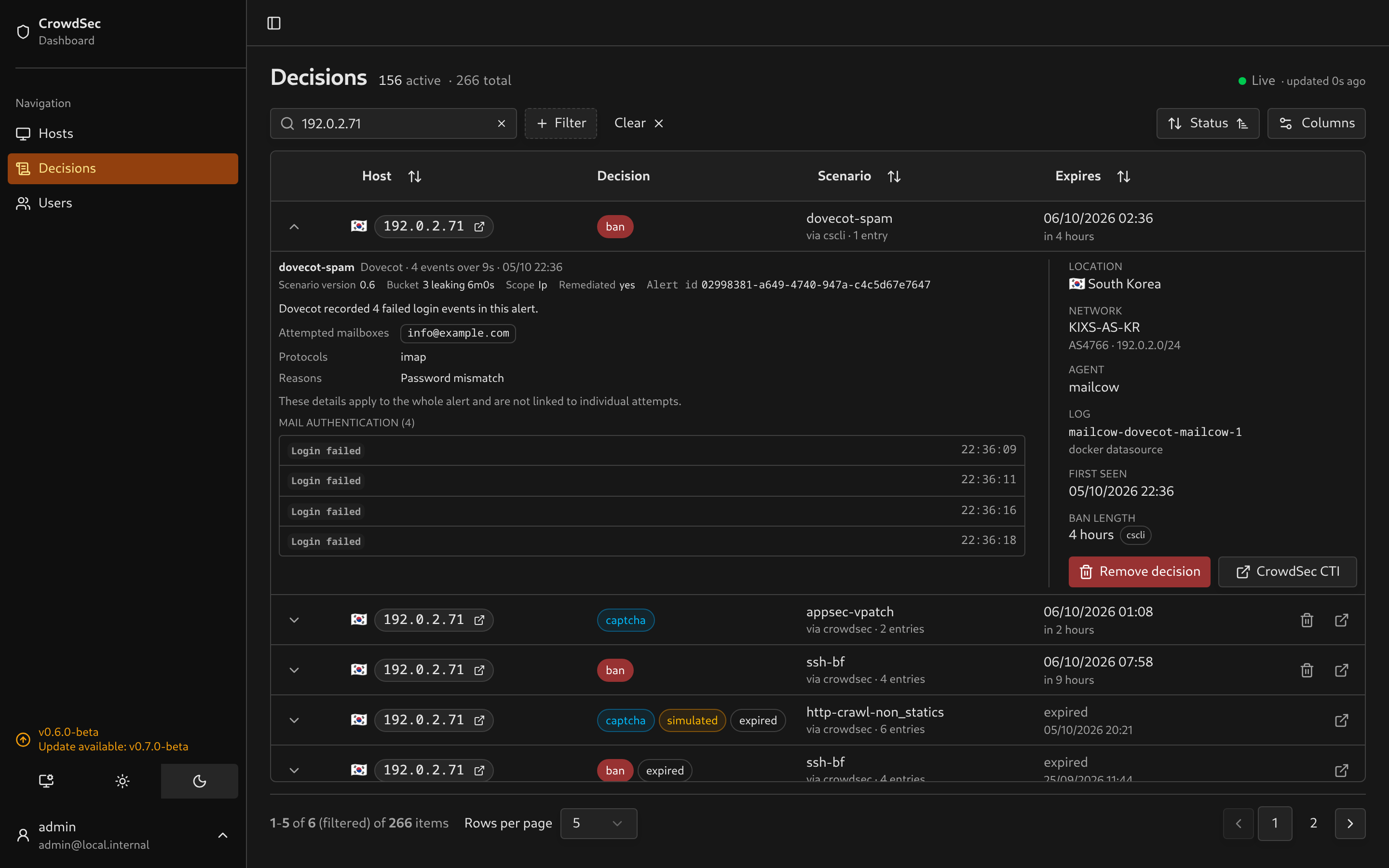
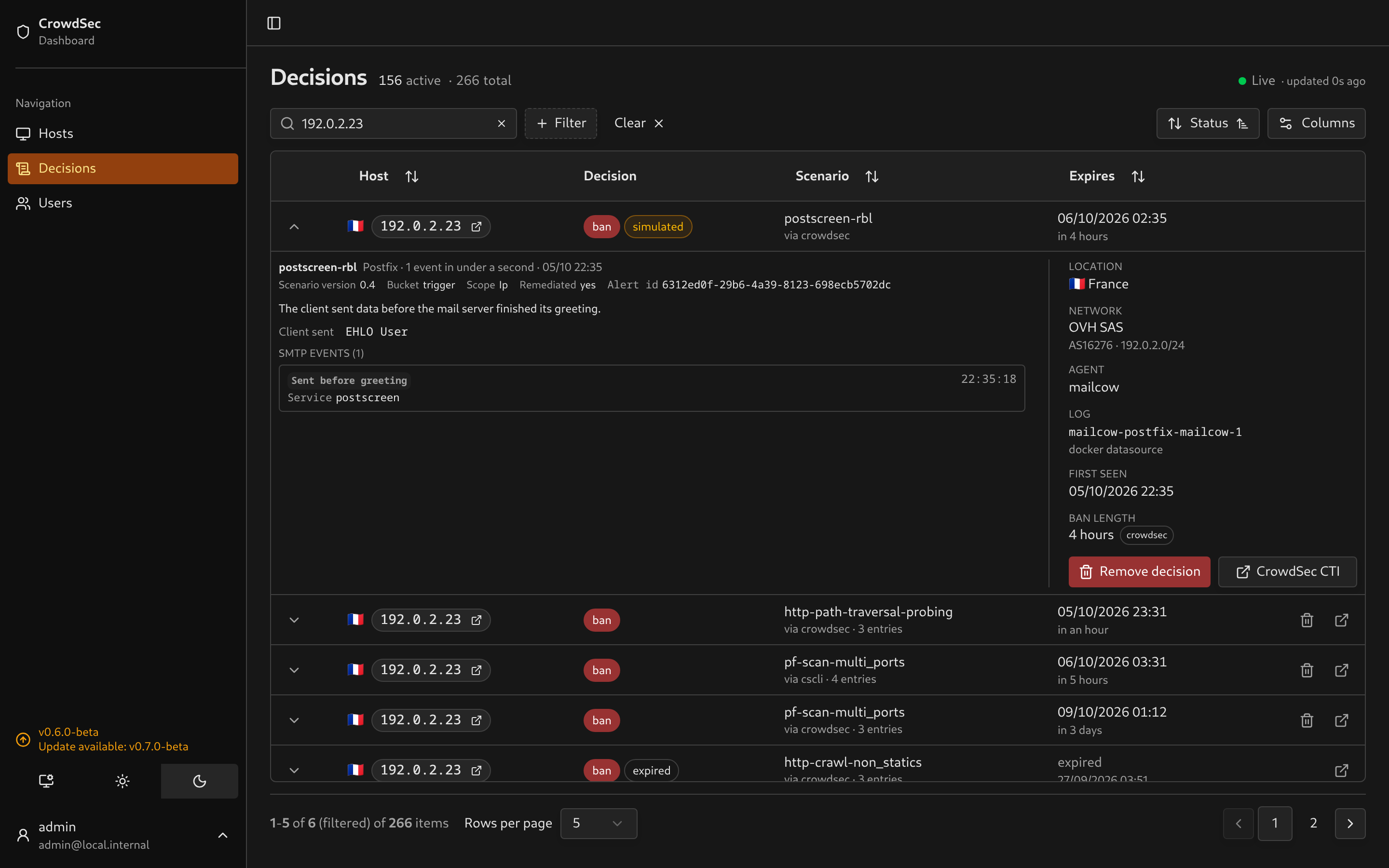
Dovecot alerts show the mailboxes tried, the protocol, the failure reason and the result of each attempt. Postfix and postscreen alerts show what the client sent, the disconnect stage, the verdict and the reason, with a plain explanation of pregreet violations and clients speaking HTTP or TLS to an SMTP port. Both have a page in the docs. Alerts synced before this release are parsed again when opened.
Hosts show what an IP has been doing
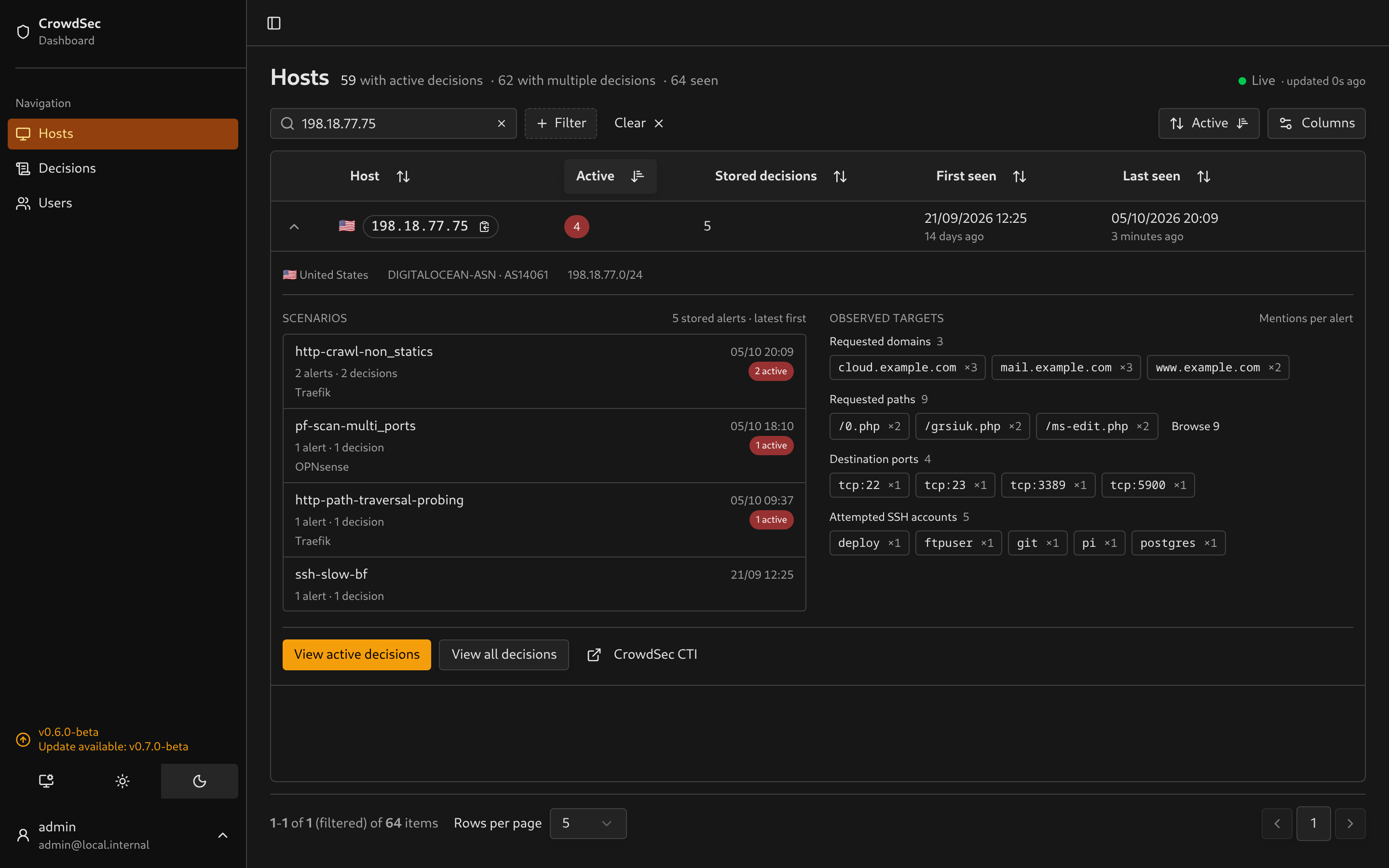
Expanding a host now loads its retained history: which scenarios fired, with counts and latest occurrence, and the domains, paths, accounts, ports and rules it targeted. Each value counts once per alert. Selecting a scenario opens the matching decisions. Nothing loads for hosts you do not expand. Details in Using the dashboard.
I hope you’ll enjoy this part, as i’ve missed a better overview of the actors hitting my own instance. If you have feedback, let me know!
Sync no longer blocks the dashboard
SQLite now runs in WAL mode. Every poll writes the full decision set in transactions, and the default journal locks the whole file for each write, so page loads and live updates waited for sync to finish. With WAL, readers keep going. Sync also stops fetching row payloads it threw away, and synchronous = NORMAL skips the disk flush after every transaction. A power failure can lose the last commits, but the next sync restores them from your Local API.
Full sync also works again above roughly a thousand active decisions. It used to fail on SQLite’s parameter limit, leaving decisions CrowdSec had already dropped active in the dashboard.
WAL adds app.db-wal and app.db-shm next to the database. Keep the db volume on a local disk, not NFS or SMB. The server warns and falls back if it cannot enable WAL. Back up with sqlite3 app.db ".backup backup.db" or copy all three files together.
Smaller things
- The Scenario filter suggests names present in your data, with counts that respect the other filters.
- Closing an expanded decision cancels its evidence request.
Upgrading
curl -o docker-compose.yml https://raw.githubusercontent.com/ollioddi/crowdsec-local-dashboard/main/docker-compose.ymldocker compose pulldocker compose up -dThen open Users and remove any account you do not recognise. There are no schema changes. The db volume survives updates and WAL is enabled on first start.
Upgrading from 0.5 or earlier? See the deployment guide for the .env move.
Breaking changes
None.
Changes
Features
- decisions: Suggest observed scenarios in text filters (#96, ffb3903)
- mailcow: Render Dovecot and Postfix alert evidence (#97, 40c63b2)
- hosts: Lazily summarize retained scenarios and targets (#98, 9e4e572)
Bug fixes
- auth: Block unauthenticated local account registration (#93, 65b9016)
- sync: Reconcile large active decision sets in bounded batches (37a6887)
- decisions: Cancel evidence requests when rows close (7b81fee)
Performance
Documentation
Dependencies
- deps: Bump the actions group with 2 updates (#90, 2262003)
- deps: Bump the minor-and-patch group with 14 updates (#91, 99f55bc)
- deps: Bump the minor-and-patch group with 13 updates (#92, e22823a)
- deps: Bump source-map-js from 1.2.1 to 1.2.2 in /docs-site (#101, 3496df1)
- deps: Bump smol-toml from 1.8.0 to 1.9.0 in /docs-site (#102, 7a24bee)
- deps: Bump sharp from 0.35.4 to 0.35.5 in /docs-site (#103, 640077c)
Full diff: v0.6.0-beta…v.0.7.0